

Desktop software for Windows and macOS
Aluminium window and door design software for Australian fabricators
Design in 3D from your supplier's profile sections, then quote, cut, draw and invoice from one desktop program.
- 3D model built from supplier profile sections
- 12 production documents
- Built-in AI assistant
Product demonstration
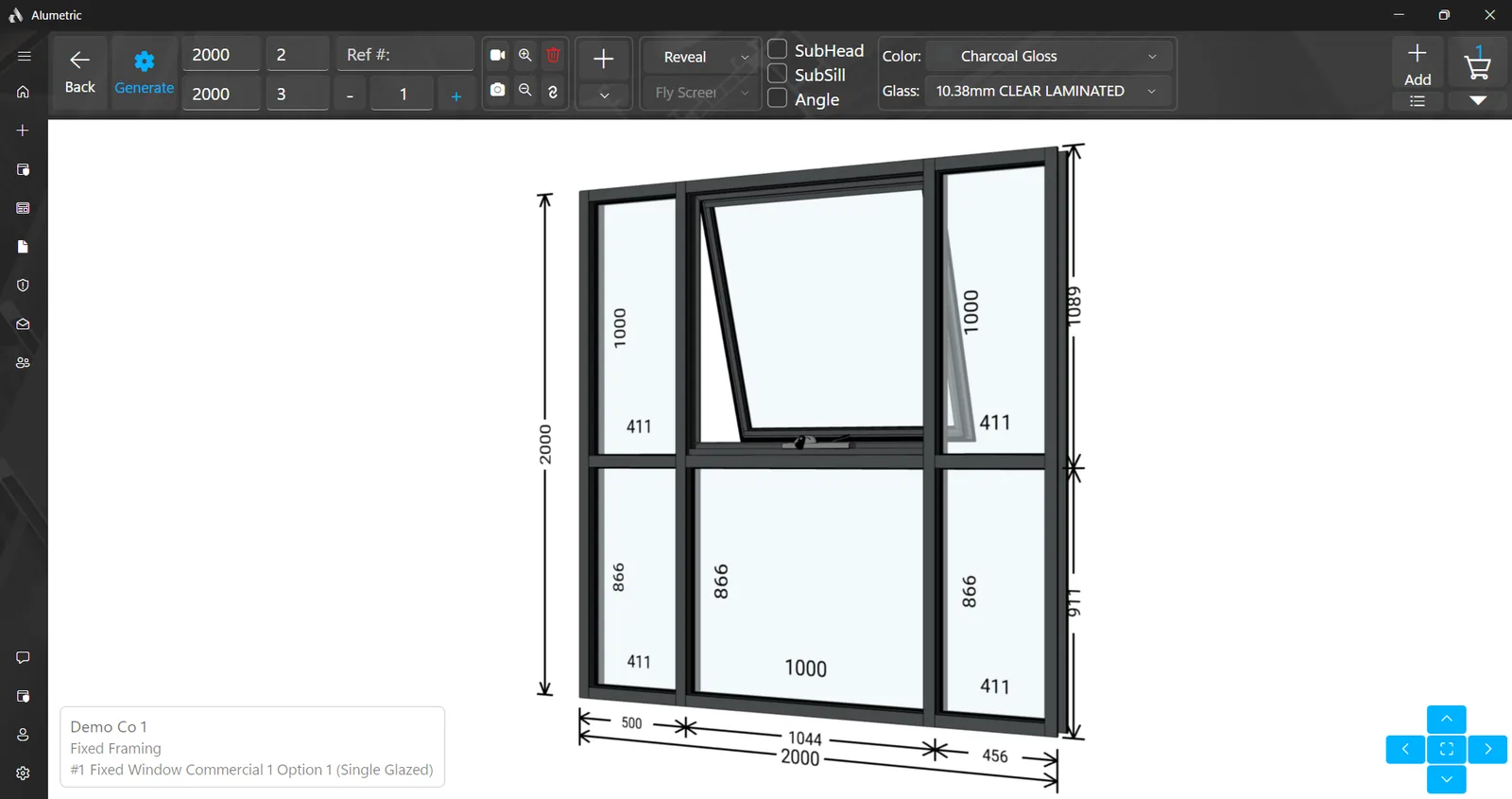
From a height and a width to a 3D model, a quotation and a cutting sheet
A window going from two dimensions to production documents. Turn the sound on for the walkthrough.
Step-by-step tutorials
See Alumetric in action, one task at a time.
Supplier profile sections
Every member is extruded from the supplier's actual cross-section
12 documents
Quote, cutting sheets, shop drawings, labels, docket, invoice, certificate
AI assistant
Reads a window schedule and fills your build list
Windows & macOS
Local, LAN or Cloud
What Alumetric does
From a height and a width to a finished job
The 3D model, the glass, the documents, the quote, the invoice and the catalogue behind them, in one desktop program.
3D design
Type a height and width, choose rows and columns, and the window is generated from your supplier's actual extrusions.
Glass
Nine glass shapes, gasket paths drawn for every pane, and frames filtered by the glass they can take.
Documents
Quotation, cutting sheets, shop drawings, labels, docket, invoice and glazing certificate, all from the same cart.
Quotes & invoicing
A dashboard for every job, a customer record behind every quote, and payment reminders that go out while Alumetric is running.
AI assistant
Chat on every page, upload a plan or schedule, and let the assistant fill the build list; unclear values are flagged for you to confirm.
Catalogues and Import & export
Hold as many supplier systems as you like, edit every profile, and import a price list from a PDF or spreadsheet.
Local, LAN & Cloud and Platforms
Run fully offline on one computer, share one set of quotes across your workshop network, or keep every location in sync through the cloud.
Documents
Twelve documents from one cart
Nothing is re-typed between the quote the customer signs and the cutting sheet the saw operator reads. Each PDF opens in the built-in viewer, ready to save, print or email.
Project quotation
Items with images, sizes, area, weight, colour, glass, hardware and prices, plus note, discount, shipping, terms, bank details and a signature block.
Standard cutting sheet
Every profile cut per item, split into aluminium, sub-frame, fly screen and louvre tables.
Special cutting sheet
Pick the profile codes you want and sort high to low, low to high, or optimised into stock lengths.
Project report
A costed breakdown of aluminium, glass, timber, hardware, mesh and louvre with total weight and total frame area.
Aluminium sheet
Profile quantities with paint and anodise perimeters for the powder coater.
Hardware sheet
Hardware quantities and lengths for the job.
Glass sheet
Every pane with its size, type and weight, ready for the glass order.
Glass labels
Printable per-pane labels for the glazing bench.
Delivery docket
Delivery address and summary with received-in-good-condition or damage-noted confirmation and both signatures.
Shop drawing
Per-item cross-sections with dimensions and drawing numbers, sliced from the 3D model.
Tax invoice
A tax invoice with payment history and the amount owing.
Glazing certificate
A glazing certificate template referencing AS 2047, AS 1288 and AS/NZS 1170.2 that you complete and sign; the inputs remain your responsibility.
AI assistant
An assistant that reads your window schedule
It sits beside every page, knows which page you are on, and turns an uploaded schedule into items you can review before anything is built.
From a plan to a build list
- Upload a window and door schedule or a site plan as a PDF or image
- Every item lands in a reviewable build list; Generate builds them all
- Unclear values are flagged for you to confirm
Work by chat or voice
- Navigate, explain any feature, create and find quotes and customers
- Drive the cart, the documents and the invoices
- Push-to-talk voice messages, transcribed to text
Knows its limits
- Does not substitute a product you do not carry
- Will not delete a quote; that stays a manual step
- Remembers your preferences, with a panel to see and forget them
Platforms and data
On one computer, on your network, or in the cloud
A desktop program for Windows and macOS, with three ways to keep your quotes.
Local
Everything on one computer. Fully offline, including invoicing, with separate workspaces when you need them.
LAN
One shared set of quotes on your local network, with the whole team working on the same jobs.
Cloud
Your quotes kept in sync across locations, with access from anywhere.
- Windows and macOS desktop app
- Light, dark and system themes, with five interface font sizes for shop-floor screens
- Any currency and a configurable tax rate on quotes and invoices
Questions
Frequently asked questions
Straight answers about what Alumetric does and where your data lives.
Getting startedDo I need CAD skills to use Alumetric?
DocumentsWhich documents does Alumetric produce?
DataDoes it work offline, or does my data go to the cloud?
PlatformsWhich platforms are supported?
CataloguesCan I use my own suppliers' profiles and prices?
AI assistantWhat does the AI assistant actually do?
ExportCan I export to CAD or share a quote with another computer?
ComplianceDoes it produce glazing certificates?
Getting startedHow do I get started?
Ask us anything else
Send it through the contact form and we will answer it directly, or ask for a demo and bring a real job.
Contact usContact
Request a demo or ask a question
Tell us about your workshop and the systems you fabricate. We'll get back to you as soon as we can, and a demo is the quickest way to see whether Alumetric fits.